AI Automation for Business: What It Is, What It Costs, How to Start
AI automation for business means using AI to take over the repetitive, rules-light work that sits between your people and the work only they can do — answering routine enquiries, moving data between systems, drafting first versions, and sorting what matters. It is not a single product you buy or a department you replace. Done well, it removes busywork while people keep the judgement. The fastest payback comes from automating one high-volume task, measuring it, and expanding from there. At AS Consulting we have taken a recurring process that ate 30 working days a month down to a single day of human oversight — a 30× time saving — by automating just one such task.
What is AI automation for business?
AI automation is the use of modern AI models to run repetitive, rules-light work end to end, with a person kept on the decisions that need judgement. What changed recently is reliability: the models underneath can now read a messy enquiry, pull the right details, and draft a sensible response without a developer hand-holding every step. That moved AI from “impressive demo” to “reliable enough to leave running” — so the businesses that benefit are not the ones with the biggest budget, but the ones who choose the right work to hand over.
Here is a two-minute overview of the framework below:
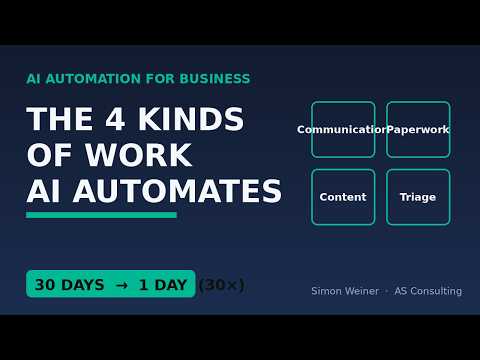
Watch: AI Automation for Business — the four kinds of work you can automate (1:20)
What can a business automate with AI?
Across any business, the automatable work falls into four kinds. Naming them lets you look at your own week and see where the hours go:
- Communication — the back-and-forth: answering enquiries, replying to routine questions, scheduling, reminders. High volume, low judgement, and usually the first place time leaks, because slow replies cost real money.
- Paperwork — moving information between forms, spreadsheets, inboxes and your systems so nobody re-types the same thing three times. Invisible work that quietly eats hours every week.
- Content — drafts, summaries and first versions. Not the finished, signed-off piece — the blank-page part. AI produces a solid draft in seconds; a person still shapes and approves it.
- Triage — sorting, routing and flagging so the right person looks at the right thing at the right time: what’s urgent, what’s a lead, what needs a specialist.
How does AI automation work for a business?
One rule decides whether a project works: AI takes the repetition, the human keeps the judgement. Automate the typing, chasing, sorting and first drafts; keep people on the pricing call, the tricky complaint and the final yes. Projects fail when they cross that line — automating the judgement, the customer recoils, and the system gets switched off. A good automation is a narrow workflow that handles one repetitive task and logs a result a person can check, not one sprawling system that tries to do everything.
What is the ROI of AI automation?
The return shows up as time and money returned to the business. Our own worked example: a recurring process that used to consume 30 working days a month now runs in a single day of oversight — a 30× time saving — by automating the repetition in one of the four areas above. Not a platform rollout, not a rebuild; one well-chosen workflow pointed at the right job. The honest caveat: that return only holds if you automate the right task — automating something low-volume or judgement-heavy can cost more to maintain than it saves, so measure before you scale.
Where should a business start with AI automation?
Start with the single area above where your business bleeds the most time — for most service firms that is communication, specifically lead follow-up. Automate one task inside it, and measure one number before and after: response time, hours saved, or enquiries handled. If the number moves, keep it and move to the next task; if it doesn’t, you have spent very little finding out. Small and measured beats big and clever, and a visible win is far easier to get a team behind.
What does AI automation cost?
Think by task, not by platform. A single, well-scoped automation is a modest one-off to set up and runs on small ongoing tool costs. Budgets spiral when a project starts as an open-ended “AI transformation” instead of “let’s fix this one thing.” Scope to the task and the maths almost always works.
What does an AI automation consultant do — and how do you pick one?
An AI automation consultant finds where your business loses time to repetitive work, then designs, builds and maintains the automation that removes it — and stays on it as your tools change. The job is process first, software second: the hard part isn’t the AI, it’s choosing the right task and wiring it into how you already work. When you’re choosing one, look for a focus on your kind of business, a measurable result agreed before any build, direct access to the person doing the work, and ongoing maintenance — automations break when the tools underneath them update. AS Consulting is founder-led, so you work directly with Simon Weiner, not an account-management layer.
AI automation by sector
The four kinds of work above show up differently by trade, but the pattern holds. Dental practices automate appointment booking and reminders; law firms automate client intake and matter triage; insurance brokers automate lead follow-up and renewals chasing; accounting firms automate client onboarding and document collection. The highest-volume, lowest-judgement task is almost always the front door — the enquiry that needs answering before a competitor answers it first. For phone and voice specifically, see AI Voice Agents — an AI receptionist that answers, qualifies and books while you work.
The other half: being found when buyers ask AI
Automation handles the work inside your business. The mirror problem is outside it: when a buyer asks ChatGPT, Gemini or Google’s AI overview who is the best provider in their area, does your business get named? Getting cited in AI answers — generative engine optimisation, or GEO — is the second thing AS Consulting does. It is a different discipline from automation but the same goal: let the machines do the repetitive reach so you spend time only on the work that needs you.
Frequently asked questions
Is AI automation only for big companies?
No. Smaller businesses often see faster payback, because automating one task removes a larger share of total admin. You need one well-scoped workflow, not a data team.
Will AI automation replace my staff?
The aim is to remove the repetitive work that wastes their time, not the judgement work only they can do. In our examples the owner keeps the quote and the relationship; the automation handles the triage and drafting.
What should I automate first?
The most repetitive, highest-volume task currently done by hand — usually lead follow-up, data entry, or first-draft content. Prove the saving on one task before expanding.
How do I know it’s working?
Pick one number before you start and measure it. If a task that used to take days isn’t meaningfully shorter within weeks, you automated the wrong thing.
How is AI automation different from traditional automation or RPA?
Traditional automation follows rigid rules and breaks on anything unexpected. AI automation can handle messy, unstructured input — reading an email, summarising a document, deciding what category something is — which is why it reaches work older tools never could.
For the practitioner view of this framework, see the companion article on LinkedIn: What “AI Automation for Business” Actually Means — and the Four Kinds of Work Worth Starting With.
What does an AI automation consultant do?
They find the repetitive work costing you time, then design, build and maintain the AI workflow that removes it — keeping a person on the decisions that need judgement. Process first, software second.
How do I choose an AI automation consultant in the UK?
Pick one who focuses on your kind of business, agrees a measurable result before building, gives you direct access to the person doing the work, and maintains the automation afterwards.
Do you offer AI automation for my industry?
Yes — the same four kinds of work (communication, paperwork, content, triage) apply to dental, legal, insurance and accounting firms; only the front-door task changes. AS Consulting tailors the workflow to your sector.
What’s the difference between AI automation and AI search visibility (GEO)?
AI automation removes repetitive work inside your business; AI search visibility (GEO) gets your business cited when buyers ask AI tools who to use. AS Consulting does both.
By Simon Weiner, founder of AS Consulting — a UK digital agency for AI, digital and automation.
Automate smarter.